Agent search - wiring retrieval into an LLM agent
Your agent isn't bad at search - your search tool is. Why "search" is three operations collapsed into one, and how three legible gRPC tools let the agent compose them without touching the prompt.
By Joe WApr 23, 202610 min read
Updated Sep 2, 2026
"Add search to your agent" sounds like a one-line ticket. Then you build it, and the agent starts doing things that make no sense. It misses a document you know is in the index. It returns something plausible but wrong. It retries the same failed query verbatim, three times, and then confidently tells the user nothing exists.
The instinct at that point is to blame the model, or to start rewriting the prompt. Both are usually wrong. Your agent isn't bad at search - your search tool is. "Search" is three different operations collapsed into one tool, and the agent is being asked to succeed at a task nobody actually gave it the means to do.
This post walks through those three layers, what each one is for, and how we expose them to an LLM agent over gRPC tools without leaking implementation details (Postgres? Spanner full-text? a vector index?) into the model's prompt.
The three layers
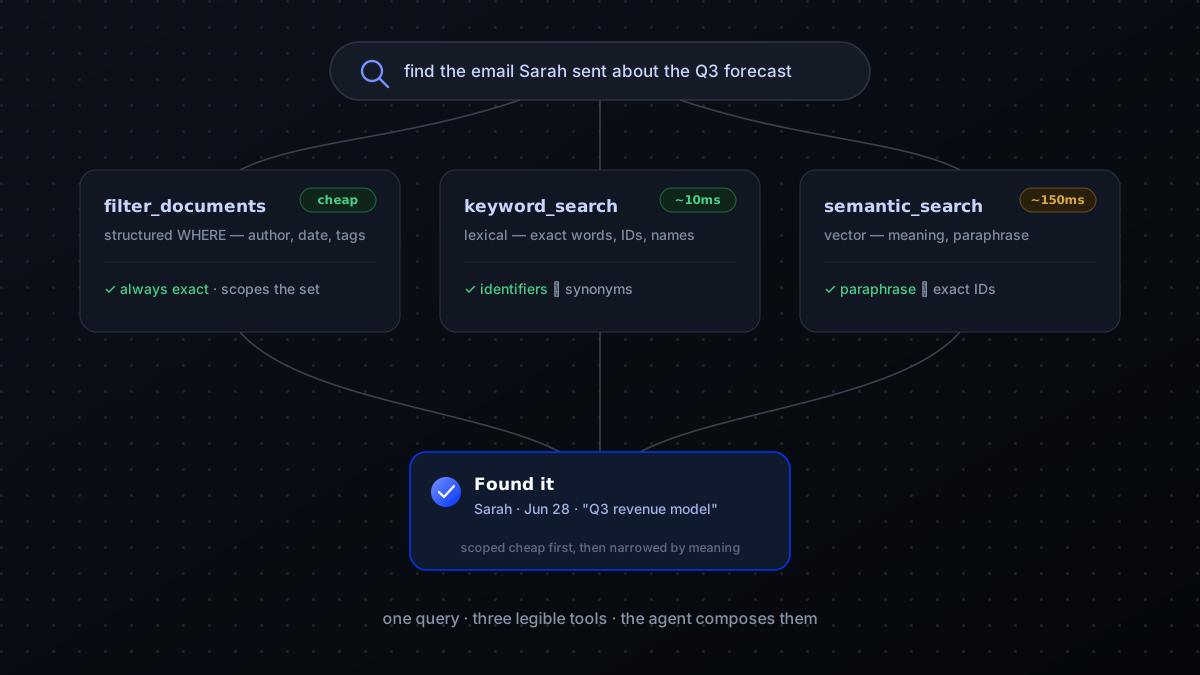
When a user types "find the email Sarah sent about the Q3 forecast," there are three independent search problems hiding in there:
- Lexical / keyword search - "find documents that contain these literal words." Postgres full-text, Elasticsearch, SQLite FTS5. Cheap, deterministic, great for exact identifiers and proper nouns. Bad at synonyms or rephrasing.
- Semantic / vector search - "find documents that mean roughly the same thing." Embed the query with the same model used to embed the corpus, retrieve nearest neighbours by cosine similarity. Great for "Q3 forecast" matching docs titled "Quarterly revenue projections." Bad at exact identifiers.
- Structured filter - "from Sarah, dated July." This is just a database WHERE clause. Always cheap, always exact, almost always required to scope the other two down to a sane working set.
Real searches are almost always all three combined. The art is composing them correctly, and the agent's job is to pick the right combination - given good tools, that's the only thing it has to figure out.
Designing the tools
Now the actual tradeoffs. You could:
- Expose ONE tool -
search(query)- and do all the heavy lifting server-side. - Expose THREE tools, one per layer, and let the model orchestrate.
- Expose ONE tool with a rich filter argument that the model fills in.
We've shipped all three patterns at different times. The pattern that works best in production: three tools, but with the structured filter shared across them. The model learns when keyword vs semantic helps; the filter is always available as a scope. Single-tool "smart search" sounds nicer in a slide deck but the model can't reason about why a result was returned, can't recover from a bad result, and tends to retry the same query verbatim when it fails.
The reason is subtler than "more control." A single smart-search endpoint is opaque to the model: when a result comes back wrong, the agent has no way to reason about why - was the phrasing off? was the scope too narrow? was this the wrong kind of matching entirely? With nothing to adjust, it does the only thing available and tries the same query again. Give it three tools and a failed semantic search becomes diagnosable - the model can widen the filter, switch to keyword matching for an identifier it spotted, or scope differently. Recovery becomes possible because the failure became legible. Single-tool "smart search" demos better and debugs worse.
The proto contract
Here's the shape we use for the structured filter. Note the field types - these are what the LLM sees in the tool schema, and the model will use exactly the names + descriptions you write here:
syntax = "proto3"; package search.v1; import "google/protobuf/timestamp.proto"; service SearchService { // Lexical / keyword search. Use for exact words, identifiers, // proper nouns. Cheap; ~10ms p99. rpc KeywordSearch(KeywordSearchRequest) returns (SearchResponse) {} // Semantic / vector search. Use for natural-language queries // where the corpus might use different words for the same idea. // ~80-150ms p99 depending on index size. rpc SemanticSearch(SemanticSearchRequest) returns (SearchResponse) {} // Pure metadata lookup — no text scoring at all. Use to scope // before/after a search, or alone when the query is fully // structured ("emails Sarah sent in July"). rpc FilterDocuments(FilterRequest) returns (SearchResponse) {} } // Filter is shared across all three RPCs. Keeping it in one message // means the agent learns the schema once and reuses it. message Filter { // ISO email or user ID. Multi-author is "any of". repeated string author = 1; // Free-form tag matches; AND across the list. repeated string tags = 2; google.protobuf.Timestamp created_after = 3; google.protobuf.Timestamp created_before = 4; // Channel / project / workspace scope. Free-form so neurons can // populate whatever segmentation they own. repeated string scope = 5; } message KeywordSearchRequest { string query = 1; // raw user words; we tokenise server-side Filter filter = 2; int32 limit = 3; // default 10, max 50 } message SemanticSearchRequest { string query = 1; // natural-language; we embed server-side Filter filter = 2; int32 limit = 3; float min_score = 4; // optional cosine cutoff; default 0.6 } message FilterRequest { Filter filter = 1; int32 limit = 2; string order_by = 3; // "created_time desc" by default } message SearchResponse { repeated SearchHit hits = 1; } message SearchHit { string document_id = 1; string title = 2; string snippet = 3; // pre-extracted; never raw HTML float score = 4; // BM25 for keyword, cosine for semantic string author = 5; google.protobuf.Timestamp created_time = 6; } A few choices worth calling out:
- The agent never sees document bodies, just snippets. If it needs the full body it calls
get_document(document_id)- a different RPC, a different cost. This keeps search responses small enough to put many results in a single tool result. min_scoreon semantic search. Vector search returns N results no matter how bad they are; a cosine cutoff lets the agent ask "give me close matches OR nothing" rather than wading through noise.- No "smart" merging across keyword + semantic. The temptation to ship a "hybrid search" RPC is strong. Resist it until you have evidence the agent can't compose the two - in our experience it can, and a hybrid endpoint hides debugging signal.
The Go server side
Implementation is the boring part. Each RPC delegates to a different backend; the gRPC handler's job is mostly mapping protos to backend calls and back:
type Server struct { pb.UnimplementedSearchServiceServer sql *sql.DB // for FilterDocuments + metadata fts *fts.Index // sqlite FTS5 / pg_trgm / Tantivy vector *vector.Index // pgvector / Qdrant / Pinecone embed embeddings.Client // model used for both indexing + queries } func (s *Server) SemanticSearch( ctx context.Context, req *pb.SemanticSearchRequest, ) (*pb.SearchResponse, error) { // 1. Embed the query with the SAME model that indexed the corpus. // Mismatched models = nonsense scores. We log model name on // every index write so this is always verifiable. vec, err := s.embed.Embed(ctx, req.GetQuery()) if err != nil { return nil, status.Errorf(codes.Internal, "embed: %v", err) } // 2. Translate the proto Filter into a backend-specific predicate. // Vector index does ANN over the candidates that match the // filter — pre-filtering is dramatically faster than // post-filtering once the corpus is large. pred := buildPredicate(req.GetFilter()) minScore := req.GetMinScore() if minScore == 0 { minScore = 0.6 // default; tune per corpus } nearest, err := s.vector.Search(ctx, vector.Query{ Vector: vec, Filter: pred, Limit: int(clampLimit(req.GetLimit())), MinScore: minScore, }) if err != nil { return nil, status.Errorf(codes.Internal, "vector search: %v", err) } // 3. Hydrate hits with metadata + snippets from the SQL store. // Vector indices typically only carry IDs + the vector itself. return s.hydrate(ctx, nearest) } The other two RPCs follow the same pattern: translate the proto, dispatch to the right backend, hydrate, return. The pre-filter step in SemanticSearch is the one thing I'd call out - pushing the metadata filter into the vector query (rather than filtering the results afterwards) is what makes this cheap as the corpus grows.
How the agent uses them
With three tools registered, here's what a useful agent turn looks like for the original query "find the email Sarah sent about the Q3 forecast":
[user] find the email Sarah sent about the Q3 forecast [agent → tool: filter_documents] { "filter": { "author": ["sarah"], "tags": ["email"] }, "limit": 50 } → 23 hits (Sarah has sent 23 emails in this corpus) [agent → tool: semantic_search] { "query": "Q3 forecast", "filter": { "author": ["sarah"], "tags": ["email"] }, "limit": 5, "min_score": 0.7 } → 2 hits, scores 0.84 and 0.71 [agent → tool: get_document] { "document_id": "doc_a1b2" } → full body [agent reply] Found it - Sarah's June 28 email "Q3 revenue model - draft for review" covers the forecast you're asking about. Here's the gist… [summary] Notice what the agent did:
- It used
filter_documentsfirst to scope by author + type - the cheap step. - Then narrowed to "Q3 forecast" semantically because "forecast" wouldn't match a literal "revenue model" title via keywords.
- Only after picking the most likely hit did it pay the full
get_documentcost.
That's good agent behaviour - and it falls out of the tool design, not from prompt engineering. The model isn't being told what to do step-by-step; the tools' descriptions and cost shape make this the obvious path.
What goes in the tool descriptions
Tool descriptions are the actual API surface for an LLM. A few things we've learned the hard way:
- Say what each tool is GOOD at and what it's BAD at. The model needs both to choose. "Use for natural-language paraphrases; bad at exact identifiers" is more useful than "Performs semantic search."
- Give example queries. A line like
e.g. semantic_search("how do we handle refunds")sets the model's default better than any abstract description. - Mention cost. "Cheap" vs "moderately expensive" makes the model order calls intelligently - narrow with cheap tools first, hit the expensive ones with smaller candidate sets.
- Don't lie about what's in the corpus. If the index is a year of Slack messages, say so. The model will hallucinate scope otherwise.
When you actually need a hybrid endpoint
Eventually you do. The cases:
- Your latency budget can't afford two round-trips and you need fused ranking server-side.
- You're using a model small enough that it can't reliably orchestrate three tools.
- Your corpus is so large that the agent's first filter step is too coarse and you need a single ranker to consider keyword + vector signals jointly.
When you reach that, the right move is to add a fourth tool - fused_search - alongside the existing three, not to replace them. The individual tools are still useful for debugging ("did keyword find this doc but vector didn't?") and for surgical agent flows where you know which signal matters.
Search is a great test case for a broader principle: the agent's job gets dramatically easier when the tools you give it are honest about what they're for. Vague, do-everything tools push the orchestration burden onto the prompt, where it's fragile and invisible. Sharp, well-described tools let the model do what it's actually good at - picking the right one for the situation in front of it. Most "the agent is unreliable" problems are tool design problems wearing a costume. It's the same reason automating a real workflow starts by naming its operations honestly rather than by writing a bigger prompt.
Thinking about an agent like this for your team?
Describe the job you want automated and our Automation Architect blueprints it in seconds — or talk it through with the engineers who ship them.