Generative UI - letting Gemini 3 design the screen
Generative UI has split into two techniques — a bounded component registry, and interfaces coded from scratch. When to reach for which, and the registry pattern end to end in Go and Vue.
By Joy MwendeMay 13, 202611 min read
Updated Sep 2, 2026
For most of the LLM era, "the model returns text" has been the unstated assumption baked into every chat product. The user types a question; the model emits a paragraph; the UI renders it as Markdown in a bubble. That's been good enough - and it's also been a ceiling.
Anything richer than text - a table, a chart, a card grid, a clickable map of search results - required someone to build a bespoke component, decide when to render it, and write glue that turned the model's text into structured data the component could consume. Three jobs, and only the third one was the model's; the first two stayed firmly with the engineer.
Generative UI is the name for the pattern that started actually working in late 2025: the model returns a structured component description alongside (or instead of) its text, and the frontend renders it. Gemini 3 Pro ships with structured output reliable enough to make this a default rather than an experiment. The agent stops being a chatbot and starts being something closer to a designer with a component library. Since then the term has split into two quite different techniques that share a name — worth pulling apart before we build one of them.
What "generative UI" actually means
Three distinct things get bundled under the term, and they're worth keeping separate:
- Markdown / rich text. The model emits Markdown; you render it. Tables, lists, code fences, links. This isn't generative UI, just polished text. Every chat product since 2023 has done this.
- Structured data + a hardcoded card. The model returns JSON conforming to a schema you defined; you render it through a component you also wrote. The model chooses the data; the engineer chose the shape. Useful but limited - adding a new card type is a code deploy.
- Generative UI proper. The model picks a component type from a registry you've published, fills in its props, and the frontend renders the corresponding component. Adding a new card type is a registry entry + a Vue component. The model gets to compose, choose, and combine - even nest cards inside other cards.
The third is what changed. Gemini 3's structured output is reliable enough at picking between options ("which of these 12 viz types fits this answer best?") that you can stop defending against the model returning shapes you can't render.
Two kinds of generative UI — and they aren't the same thing
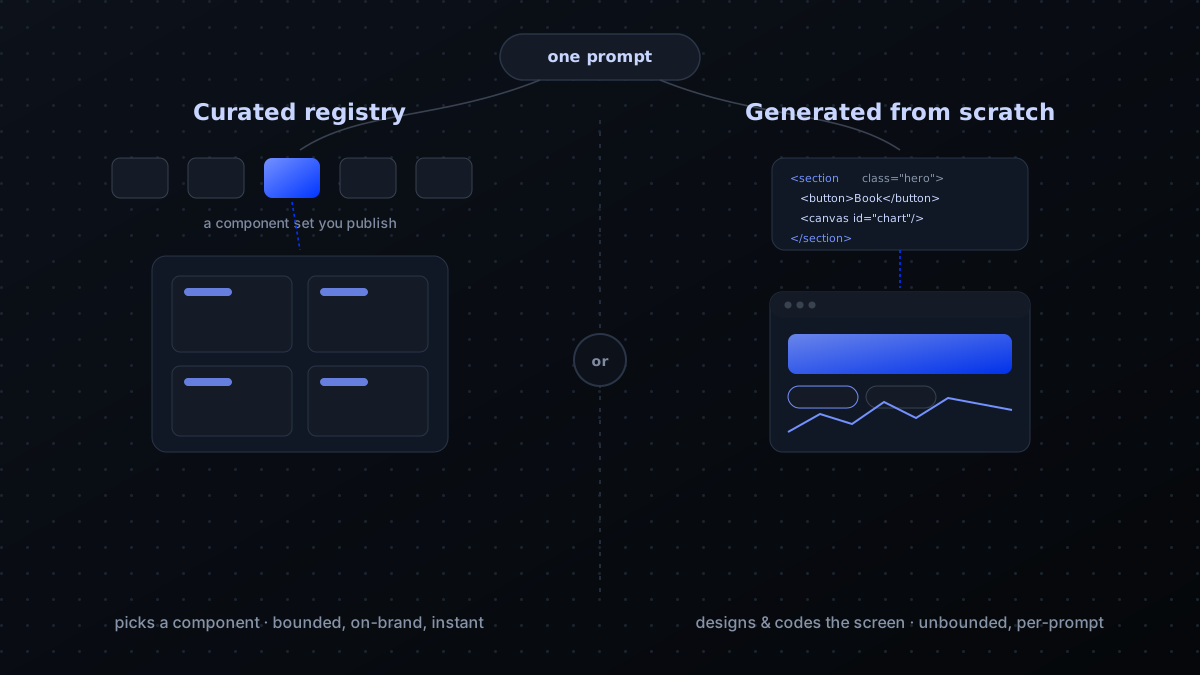
Since Gemini 3 Pro landed, "generative UI" has come to mean two techniques that share a name and almost nothing else. The line between them is simply what the model returns:
- A curated component registry. The model returns structured data that selects from a fixed set of components you built and styled, and fills in their props. The vocabulary is bounded - the model composes your cards, it never emits markup. Predictable, on-brand by construction, and fast, because there's nothing to compile. This is the approach the rest of this post builds.
- Code generated from scratch. The model writes the interface - HTML, layout, sometimes a working mini-app - bespoke to each prompt, with no fixed component set at all. This is what Google now brands "Generative UI": Gemini 3 Pro's agentic-coding ability powering the Gemini app's Dynamic View and Search's AI Mode, which design and code a custom interactive response per prompt. Unbounded and often striking - Google reports users prefer these bespoke interfaces to a standard result the large majority of the time - but slower, non-deterministic, and impossible to keep rigidly on-brand.
Neither is the "better" one; they trade off on opposite axes. Code-from-scratch wins for open-ended consumer prompts, where the space of good answers is enormous and there's no brand contract to honour. The registry wins inside a product - where the same answer should look the same every time, the surface has to match a design system, and a broken render is not an acceptable outcome. For an agent embedded in an app, bounded is a feature, not a limitation.
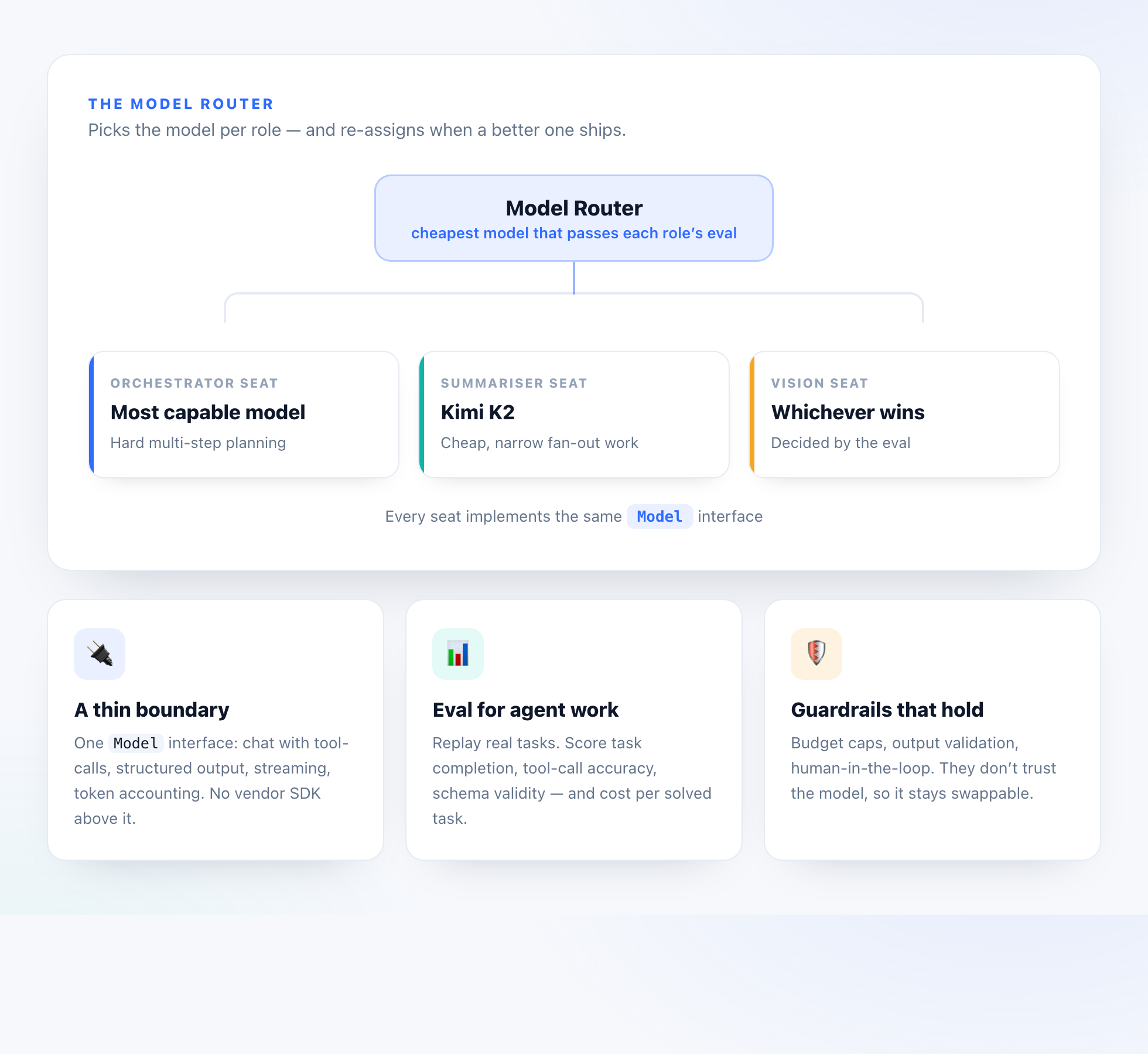
The rest of this post is the registry approach, end to end - the one you reach for when the model is a component inside your product, not the whole surface. Here's the shape of it:
What Gemini 3 actually changed
Generative UI has been technically possible since GPT-4 added function calling. What changed with Gemini 3 (and similar 2025-2026 frontier models) was the combination that makes it production-ready:
- Structured Outputs is now its own primitive - and Google draws the line that clears up years of confusion: function calling is for the intermediate step where the model reaches your tools or data; structured outputs is for the final response conforming to a schema you'll render. A viz envelope is squarely the second. When you tell Gemini 3 "respond conforming to this JSON schema," it does - at rates indistinguishable from "always." No
JSON.parseretry loops, no "I think you meant…" wrappers. - Structured outputs compose with grounding in a single turn. Gemini 3 lets you combine hosted tools - Grounding with Google Search, URL context - with a structured-output schema. The model fetches live web data and hands it back already shaped as your component's props. A "here are 3 places near you, live-sourced" card is now one call, not fetch-then-reshape.
- Built-in and custom tools in one turn. The Gemini 3 series can mix its hosted tools with your own function declarations in the same request, so the reply that runs a lookup and attaches a viz envelope composes correctly instead of needing two round-trips.
- Streaming latency. Streaming structured output - so the UI renders as fields arrive, not after the whole reply is back - is fast enough to feel live. The candidate watching the apply modal autofill while the agent is still scoring them is generative UI as a perceived experience.
- Long-enough context to fit a useful component registry. We describe 30+ viz types in the system prompt without burning meaningful budget, and the model picks correctly between them. Where latency on the selection path matters more than raw reasoning, the Flash-tier model is the swap.
The viz envelope
The wire format is small: a viz_type string that picks a component, and a viz_data JSON blob the component consumes as props. We carry it as a metadata field on the existing message/artifact channels so it composes with text - the agent can reply "here are the top three places" and ATTACH a place_card_grid alongside.
syntax = "proto3"; package agent.v1; import "google/protobuf/struct.proto"; // VizPayload rides alongside agent text on the same message — it's // metadata, not a replacement. The frontend renders the text bubble AND // the visualisation; either alone is a valid response. message VizPayload { // Component identifier from the published registry. Examples: // "place_card_grid" — list of place cards // "itinerary_day_list" — multi-day itinerary // "match_score_panel" — single score with breakdown // "skill_chip_diff" — matched vs missing skills // // The set of valid values is the same set the model is told about // in the system prompt. Unknown values render as a graceful fallback // (text-only) instead of an error. string viz_type = 1; // Component-specific data, shaped exactly to that component's props. // We pass JSON-as-Struct rather than a per-component Any-of-message // because the cardinality of viz types is fluid and we don't want to // re-publish the proto bundle on every new card. google.protobuf.Struct viz_data = 2; } // Multiple visualisations in a single response — for "search results // AND a chart of frequency over time" kind of replies. Order matters // (rendered top-to-bottom) and each renders as its own bubble. message MultiVizPayload { repeated VizPayload payloads = 1; } Why google.protobuf.Struct instead of strongly-typed messages per viz? Because generative UI's whole point is that the set of valid viz types grows quickly. Adding a new card shouldn't require a proto bump, a regenerate, and a coordinated deploy across three services. The trade-off is type safety on the wire - but the contract that matters lives in the system prompt + the component's TypeScript prop interface, both of which are easy to evolve.
The agent side, in Go
We emit viz payloads from the same after-tool callback that handles other side-effects. When a tool returns data the model later wants to visualise, it sets a structured output field that the executor packages into the artifact's metadata:
// emitViz attaches a VizPayload to the next artifact event the agent // streams back to the caller. Called from the after-tool callback when // a tool's result has a natural visual rendering — list_places, score // a candidate, lay out an itinerary, etc. // // The pairing with the text artifact is intentional: viz NEVER replaces // the prose. If the candidate's network can't load the component bundle, // or the registry doesn't know the viz_type yet, they still see the // agent's textual answer. func emitViz(ctx context.Context, q a2asrv.EventQueue, taskID string, viz VizPayload) error { payload, err := structpb.NewStruct(map[string]any{ "viz_type": viz.Type, "viz_data": viz.Data, }) if err != nil { return fmt.Errorf("encode viz: %w", err) } return q.Write(ctx, &a2a.TaskArtifactUpdateEvent{ TaskId: taskID, Artifact: a2a.Artifact{ ArtifactId: uuid.New().String(), Parts: []a2a.Part{ {Data: payload} }, // Metadata flag tells the SPA: this artifact is a viz, not // accumulating text. Render it as a card, not as a stream // of characters concatenated to the previous bubble. Metadata: map[string]string{"kind": "viz"}, }, Append: false, }) } One Gemini 3 gotcha worth wiring in before this bites you in production: thought signatures. Gemini 3 returns an encrypted representation of its reasoning with each turn, and for agentic flows it now enforces them - if your tool loop calls back without echoing the signature from the previous step, the API returns a 400 on that turn rather than silently degrading. The official SDKs handle this automatically as long as you pass the full chat history back unmodified; the failure mode is a hand-rolled loop that reconstructs messages and drops the signature. Since a viz payload is usually emitted after a tool step, that loop is exactly the code path that has to preserve it.
Where do the viz_type strings come from? From the system prompt. We tell Gemini 3 something like:
When your reply naturally includes structured visual content, attach exactly one viz payload alongside your text by selecting a viz_type from this list and supplying viz_data that matches its schema:
•place_card_grid- list of place cards. Schema: { items: [{ name, rating, address, photo_url }] }
•itinerary_day_list- multi-day itinerary. Schema: { days: [{ date, activities: [...] }] }
•match_score_panel- score + analysis. Schema: { score: 0-1, analysis: string, matched: [...], missing: [...] }
Do NOT invent a viz_type. If nothing fits, omit the viz payload.
Gemini 3 picks correctly almost always. Older models would invent a fourth type and hallucinate a schema; this generation reliably picks "none" when nothing fits.
The frontend - a registry and one render
Vue (or React, same shape) handles the render side with a registry mapping viz_type strings to component classes. New cards = one registry entry + one Vue file. No central switch statement to grow.
import { defineAsyncComponent, type Component } from 'vue' // Registry of every viz_type the model is allowed to emit. Keep this // in lockstep with the list in the system prompt — adding a card is a // two-line change here AND a one-line change there. // // defineAsyncComponent lets each card live in its own chunk so the // initial bundle stays small. The card only loads when the model // first emits its type. export const vizRegistry: Record<string, Component> = { place_card_grid: defineAsyncComponent(() => import('@/components/viz/PlaceCardGrid.vue')), itinerary_day_list: defineAsyncComponent(() => import('@/components/viz/ItineraryDayList.vue')), match_score_panel: defineAsyncComponent(() => import('@/components/viz/MatchScorePanel.vue')), skill_chip_diff: defineAsyncComponent(() => import('@/components/viz/SkillChipDiff.vue')), receipt_summary: defineAsyncComponent(() => import('@/components/viz/ReceiptSummary.vue')), } // Resolve a viz_type to a component, returning undefined for anything // not registered. The chat shell renders the underlying text artifact // when the lookup fails — so an unknown viz_type degrades gracefully // rather than blocking the whole reply. export function resolveViz(vizType: string): Component | undefined { return vizRegistry[vizType] } <script setup lang="ts"> import { computed } from 'vue' import { resolveViz } from '@/composables/vizRegistry' const props = defineProps<{ vizType: string vizData: Record<string, unknown> }>() const Component = computed(() => resolveViz(props.vizType)) </script> <template> <!-- If we don't know the viz_type, render nothing - the chat shell already showed the text artifact and that's the fallback. --> <component v-if="Component" :is="Component" v-bind="vizData" /> </template> That's the entire dispatch. Each card component owns its own props interface, its own styling, its own internal interactivity. The model picks; the registry resolves; the component renders.
Where this gets you something real
Generative UI is most valuable when one of three things is true:
- Heterogeneous answers. A trip-planning agent might reply with a place list, an itinerary, a budget breakdown, a weather card - depending entirely on what the user asked. Hardcoding "always show X" wastes screen space when X isn't relevant.
- Composition matters. "Top three restaurants AND a price-vs-rating scatter plot AND a map" is one reply with three viz payloads. The model decides the combination; you don't pre-design every possible permutation.
- Iteration speed. Adding a new card type goes from "design + proto change + backend deploy + frontend deploy" to "design + Vue file + registry entry + prompt update." Days to hours.
Where this is the wrong tool
Equally important - when generative UI is overkill or actively harmful:
- Forms / data entry. If the user is filling something in, do not let the model design it. The form is your contract; designing it on every render breaks user muscle memory and causes a11y nightmares.
- Brand-critical surfaces. Marketing pages, checkout flows, anything where consistency drives trust. The model is allowed to choose between approved cards; not between "a button" and "a button plus a dancing emoji."
- Single-shape answers. If the agent only ever returns one viz type, you've built a JSON-mode tool, not generative UI. Skip the indirection - just call your component directly with the structured output.
The honest trade-offs
Two real costs nobody mentions until they ship the second card:
- The system prompt grows. Each registered viz type adds 1-3 lines to the prompt (name + when to use + schema). At 20 cards you've burned a few hundred tokens on every turn. Worth it; not free.
- The model needs to understand the cards. A card called
chartwith no further description gets misused.place_card_grid - list of nearby restaurants/hotels with rating + photo, USE for "find me places" type questions, NOT for individual lookupspicks itself correctly. Spend the time on the descriptions.
Generative UI is the natural next layer up from MCP tools. Tools let the model do things. Generative UI lets it show things. Together - and especially over A2A, where the viz payload is just another kind of artifact in the streaming response - you stop building chatbots and start building products that happen to be driven by an LLM — which is the line the agents we build are meant to sit on.
Thinking about an agent like this for your team?
Describe the job you want automated and our Automation Architect blueprints it in seconds — or talk it through with the engineers who ship them.